Survival Budget: A Financial Safety Checker for When Money's Tight
Design Constraint
Survival Budget was built to answer one question quickly: Am I going to be okay this month?
It does not optimize spending categories. It clarifies priority coverage.
Am I going to be okay this month?
If you've ever stood in a grocery store trying to decide if you can afford the good coffee or if you need to put it back, you've asked yourself this question. If you've refreshed your bank account three times before paying a bill, wondering if that payment will clear without overdrafting, you know exactly what I'm talking about.
That question isn't about detailed budgeting. It's about survival. And most budgeting apps have no idea how to answer it.
The Problem: Budgeting Apps Are Built for the Wrong Moment
Most budgeting apps focus on tracking and categorizing every transaction. They are built for optimization, not survival.
That's great if you're optimizing. If you're trying to save an extra $200 this month or deciding whether to switch streaming services, those apps work fine. But when you're under actual financial pressure, when money is tight and you're making hard decisions about what you can and can't afford, those apps are worse than useless. They're overwhelming.
The real issue is that optimization tools flatten urgency. They treat your rent and your Netflix subscription the same way, sitting in identical lists with equal weight. When you're stressed about money, looking at 47 transactions doesn't help you figure out what matters. It just reminds you that everything costs money and you don't have enough of it.
I tested every major budgeting app while dealing with my own financial stress. They all fail the 30-second test. Can you open the app and know, within 30 seconds, if you're going to be okay this month? No. You have to scroll through categories, look at your remaining budget in eight different areas, and do math in your head to figure out if the $200 left in "Miscellaneous" covers gas, groceries, and that dentist appointment you've been putting off.
The apps assume you want to track everything. They assume you have the mental bandwidth to categorize transactions, review spending patterns, and set goals for next month. They're built for people who are managing money, not people who are surviving on it. And worse, they make you feel guilty. Every time you open the app and see that you overspent in "Dining Out" or that you're behind on your savings goal, it's a reminder that you're failing.
What I needed, what a lot of people need, is something that answers one question: Am I going to be okay this month? Budget without the tracking burnout.
The Solution: Survival First, Then Build Up
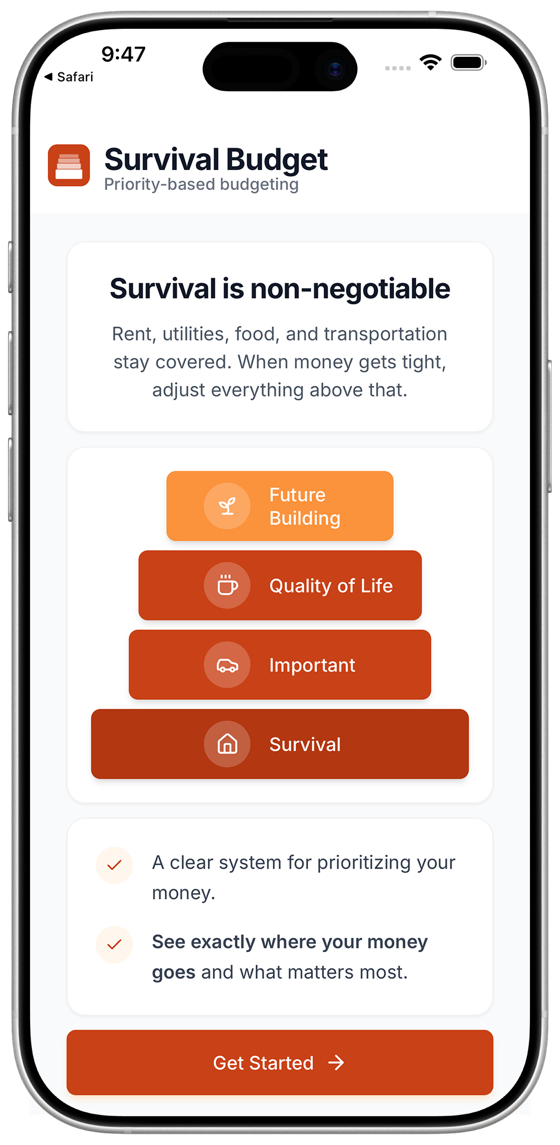
I built Survival Budget around a simple hierarchy. Not all expenses are equal. Some things are literally survival, some are important but not life or death, some are nice to have, and some are investments in your future.
Four tiers:
Survival
Core obligations. Non-negotiable.
Important
Necessary but flexible. Managed under pressure.
Quality of Life
Discretionary. First to compress when the budget tightens.
Future Building
Deferred when unstable. Restored when capacity returns.
The four tiers function as a hierarchy, not a list. Allocation flows from survival upward. When money is tight, cuts happen from the top down.
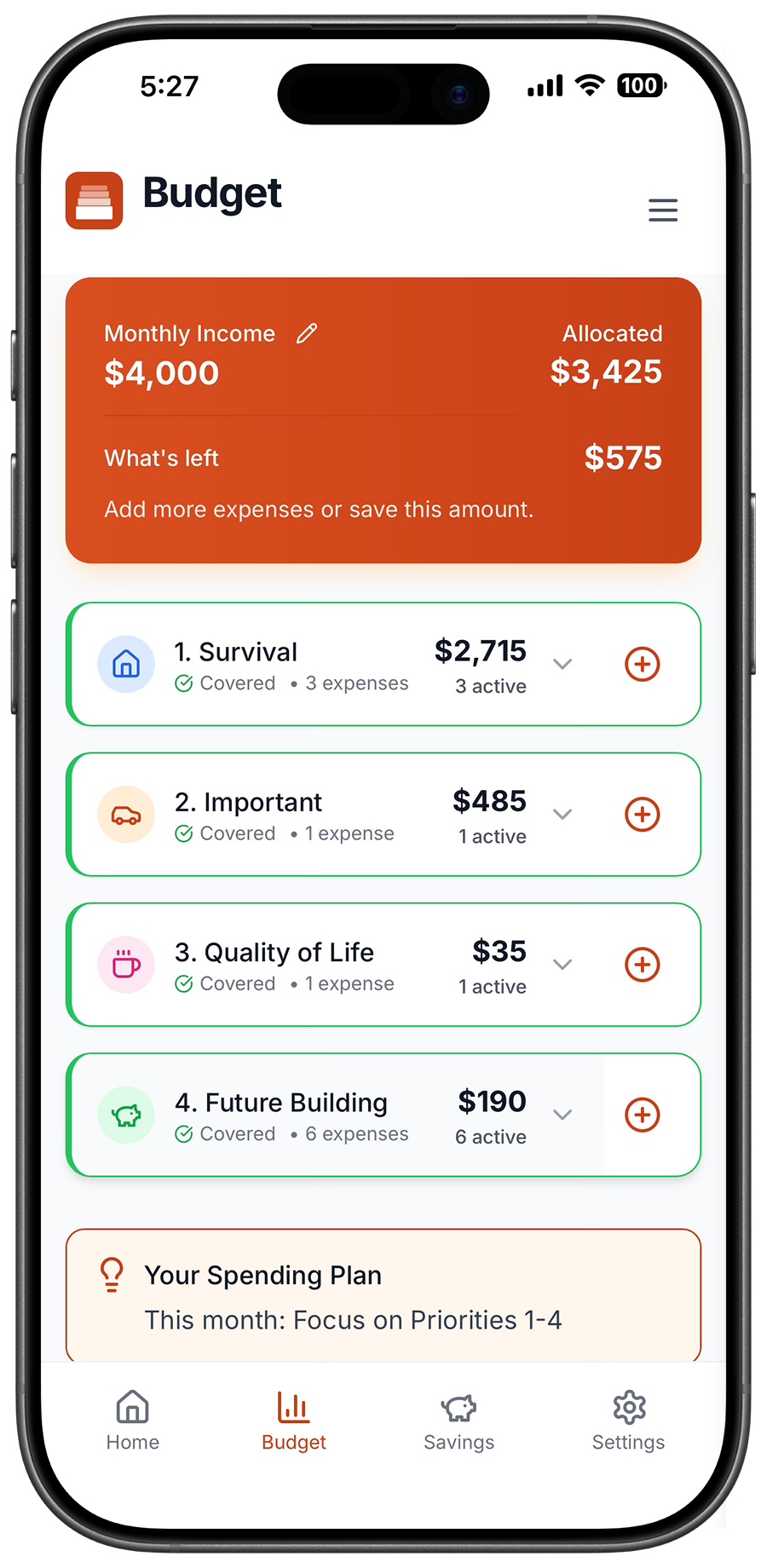
The app shows you your income at the top, then each tier and how much you've allocated to it. As you add expenses, you watch your remaining money go down. When you hit zero, you're done. You can see exactly where you are. Can you cover survival? Yes or no. Can you cover important? Yes or no. Can you afford quality of life this month? Yes or no.
Just clarity about what you can and can't do right now.
The Build: Starting with Google Sheets
I validated the hierarchy in Google Sheets before building an interface. If the structure worked in a spreadsheet, it would work in an app.
One column for income. Four columns for expense tiers. A running total that showed me how much I had left. I used it for myself first, then shared it with a few friends who were also dealing with financial stress. It worked. People got it immediately, filled it out in five minutes, and knew exactly where they stood. No confusion. No overwhelm. Just answers.
I spent a few weeks watching people use the sheet. I noticed patterns. Some people put their gym membership in Quality of Life, others put it in Important because it was tied to their mental health. Some included debt minimums in Survival, others put them in Important. The categories weren't rigid. They were personal.
I also noticed that people needed to see their survival expenses covered before they could relax about anything else. If survival was covered, they could make decisions about the rest without panic. If survival wasn't covered, nothing else mattered.
That validation gave me the confidence to build it properly. I moved to React and TypeScript, built a clean interface, and started real beta testing.
Early Validation: Real Users, Real Feedback
Week one of beta testing taught me more than months of building alone. One tester told me, "This is the first budgeting tool that didn't make me feel worse." That's the goal. Reduce anxiety. Give people clarity. Let them get on with their lives.
Beta testing surfaced three categories of feedback:
- Trust: Privacy clarity needed to be explicit. I added a plain-language privacy page and an onboarding note explaining everything stays in their browser. No servers. No tracking.
- Stability: Persistence bugs required immediate fixes. One user lost their data after a refresh. Fixed it in a day and tested across every platform I could find.
- Flexibility: Users needed easier category switching. Moving expenses between priorities was buried in the UI. I added a dropdown. Now it's obvious.
I also tested the tagline: "Budget without the tracking burnout." Nine out of ten testers said it resonated immediately. The one who didn't loves tracking every penny. That person is not my target.
Beta testers consistently highlight the same thing: the four-tier priority system makes budgeting clear. One tester said the categories were "really helpful with putting things into perspective." Another, who had "never found a budgeting method that worked," said they loved "how easily everything is divided and clear." The most requested feature? Savings goals. People want to cover survival first, then build toward something.
Who This Is For
After months of testing and iteration, I know exactly who Survival Budget serves.
It's not for people who love budgeting. It's not for people who want to optimize their savings rate or track their net worth or compare their spending to last month.
It's for people who need systematic guidance for hard spending decisions. People dealing with financial pressure who need to know, right now, if they're going to be okay. People who've asked themselves, "Can I afford groceries this week?" or "Should I skip this bill to cover that one?" or "Am I going to overdraft if I pay rent?"
What's Next
Survival Budget is live. I continue refining it based on real usage patterns and feedback around clarity, privacy, and flexibility.
Survival Budget is available now on the App Store. Download it here.